
The Ultimate Guide to Choosing a TV Drywall Anchor
Understanding Wall Types and TV Mount Mechanics
The best drywall anchor for TV installations depends on your wall structure and mount style. For hollow walls without stud support holding low-profile or tilting brackets, heavy-duty metal strap toggles and engineered load-distributing drywall anchors offer the most dependable hold by distributing weight across the rear face of the sheetrock. For steel studs, specialized metal stud strap toggles are required, while heavy displays or full-motion articulating mounts demand lag bolts driven directly into solid wood framing.
Mounting hardware behaves differently depending on the structural backing behind your wall surface. Drywall consists of a gypsum plaster core pressed between two sheets of paper. While gypsum handles downward compression well, it has low tensile strength and crumbles when subjected to point loads or excessive rotational torque.
Assessing Wood Studs, Metal Studs, and Hollow Drywall
Before selecting any hardware, determine the internal structure of your wall:
- Wood Studs: Standard residential construction typically places 2×4 or 2×6 wood framing spaced 16 inches or 24 inches on center. Driving a 1/4-inch x 2.5-inch lag bolt into the center of a sound wood stud provides over 200 lbs of holding strength, while a 3/8-inch x 3.5-inch lag bolt delivers 500+ lbs. When a wood stud aligns with your desired screen location, mounting directly into the lumber is always the preferred approach.
- Metal Studs: Common in modern high-rise apartments and commercial structures, light-gauge steel studs lack the thickness required to grip the threads of a standard lag bolt. Screws driven into thin-gauge metal will strip the metal flange. Securing a TV mount to metal studs requires specialized strap toggles or steel stud anchors that clamp across the rear channel of the stud.
- Hollow Drywall: When stud locations do not align with your screen placement, you must rely on the drywall substrate itself (commonly 1/2-inch or 5/8-inch thickness). If you are looking for the cheapest ways to install a TV without studs, mechanical toggle bolts and specialized hollow-wall anchors provide a mechanical hold by spreading weight across the rear face of the gypsum board.
Shear Load vs Cantilever Dynamic Forces in TV Brackets
Weight ratings on drywall anchor packaging reflect static shear load—the straight downward gravitational pull against the wall plane. When a TV hangs flush against the wall on a fixed bracket, nearly all force acts in pure shear.

When using an articulating or full-motion mount, the mechanics change:
- Cantilever Extension: Extending a 40 lb TV on a 20-inch articulating arm creates a lever arm. This multiplies the static load by a factor of 2x to 3x at the upper anchor points.
- Tension vs. Compression: The top fasteners experience severe outward pull-out (tensile) force, trying to yank the anchor through the drywall. Meanwhile, the bottom of the bracket drives inward against the drywall surface in compression.
- Dynamic Movement: Adjusting, swinging, or tilting the screen introduces dynamic cycling loads. In standard hollow drywall, repeated cycling can pulverize the gypsum core around the fastener barrel, leading to structural fatigue over time.
For full-motion brackets holding medium-to-large displays, anchors must bridge across solid wood framing or use structural backing plates.
Top Hardware Round-Up: Best Drywall Anchor for TV Mounts
Different fasteners rely on distinct mechanical principles to support weight across drywall and stud cavities.
| Fastener Type | Substrate Compatibility | Holding Mechanism | Required Drill Hole | Recommended Mount Type |
|---|---|---|---|---|
| Heavy-Duty Strap Toggle (1/4″-20) | Drywall, Metal Studs, Hollow Block | Rear metal clamping channel | 1/2-inch | Low-Profile, Tilting |
| GHOSTUD GS1 | 1/2″ or 5/8″ Drywall | Wide surface load distribution | 1-inch hole saw | Low-Profile, Tilting |
| Engineered Drywall Anchor | 1/2″ Drywall | Rear-flange mechanical lock | 13/16-inch | Low-Profile, Tilting |
| Steel Stud Strap Anchor | Metal Studs | Steel flange backing clamp | 1/2-inch | Low-Profile, Tilting |
| Standard Spring Toggle (1/4″) | Drywall, Plaster | Spring-wing rear expansion | 5/8-inch | Lightweight / Fixed Only |
| Self-Drilling Zinc / Nylon | Drywall Only | Thread friction in gypsum | Self-tapping | Small Displays / Accessories (<15 lbs) |
| Wood Lag Bolt (3/8″ x 3.5″) | Solid Wood Studs Only | Deep wood thread engagement | 7/32-inch pilot | Full-Motion, Heavy Screens |
Heavy-Duty Toggle Bolts and Strap Toggles as the Best Drywall Anchor for TV Panels
Solid metal strap toggles improve upon traditional spring-wing toggle bolts. Traditional spring toggles require you to insert the bolt through the bracket before pushing the collapsible wings through the wall. If you back the bolt out, the metal wings fall down inside the wall cavity. For a deeper breakdown of these mechanisms, read a practical guide to molly bolt vs toggle bolt comparisons.
Strap-style toggles solve this issue using solid metal channels connected to plastic guide straps:
- A 1/4-inch-20 strap toggle provides reliable holding power in hollow drywall by clamping a solid steel channel flat against the rear drywall face, requiring a 1/2-inch pre-drilled hole.
- A 3/16-inch strap toggle provides solid support for moderate loads using a smaller 3/8-inch pre-drilled hole.
- The solid metal channel sits flush against the rear drywall face, spreading tensile and shear forces over a broader footprint than standard expansion sleeves.

Load-Distributing Engineered Fasteners: Finding the Best Drywall Anchor for TV Systems
Standard toggle bolts direct their clamping pressure onto a narrow metal channel behind the wall. Engineered load-distributing fasteners increase the contact surface area against the gypsum to resist tear-out under heavy shear.
Our GS1 Ghostud Drywall Anchor installs using a 1-inch hole saw and is rated for up to 250 lb shear in 1/2 in or 5/8 in drywall. For ultra-heavy installations requiring broader load spreading across hollow walls, the GS2 installs with a 2-inch hole saw and is rated for up to 1,000 lb shear in 1/2 in or 5/8 in drywall. Both models are manufactured in the USA from 100% recycled plastic and sold in 2-packs and 20-packs.
Note on Wall Suitability: GHOSTUD fasteners are engineered exclusively for vertical drywall installations. They are not suitable for plaster, lath, brick, masonry, concrete, tile over backer board, or light-gauge metal studs. When mounting directly over wood framing, drive lag bolts into the center of the wood stud rather than installing drywall anchors.
Metal Stud Anchors and Specialty Steel Fasteners
Standard wood lag screws strip out immediately when driven into the 20-to-25 gauge sheet metal framing found in modern condominiums. For steel studs:
- Metal Stud Strap Toggles: Heavy-duty strap toggles designed for steel studs clamp securely across the interior channel of the metal framing to prevent thread strip-out.
- Titanium Pilot Drill Bits: Standard wood drill bits dull or walk across slick steel studs. A titanium pilot-point bit cuts cleanly through both the 1/2-inch drywall facing and the steel stud flange behind it.
- Clamping Mechanism: The fastener channel flips open flat against the inside flange of the steel stud, locking the TV bracket securely against the wall assembly with 1/4-20 machine screws and washers.
Step-by-Step Installation Process and Safety Best Practices
Installing heavy-duty anchors correctly ensures the hardware reaches its published shear rating without damaging the surrounding drywall core.
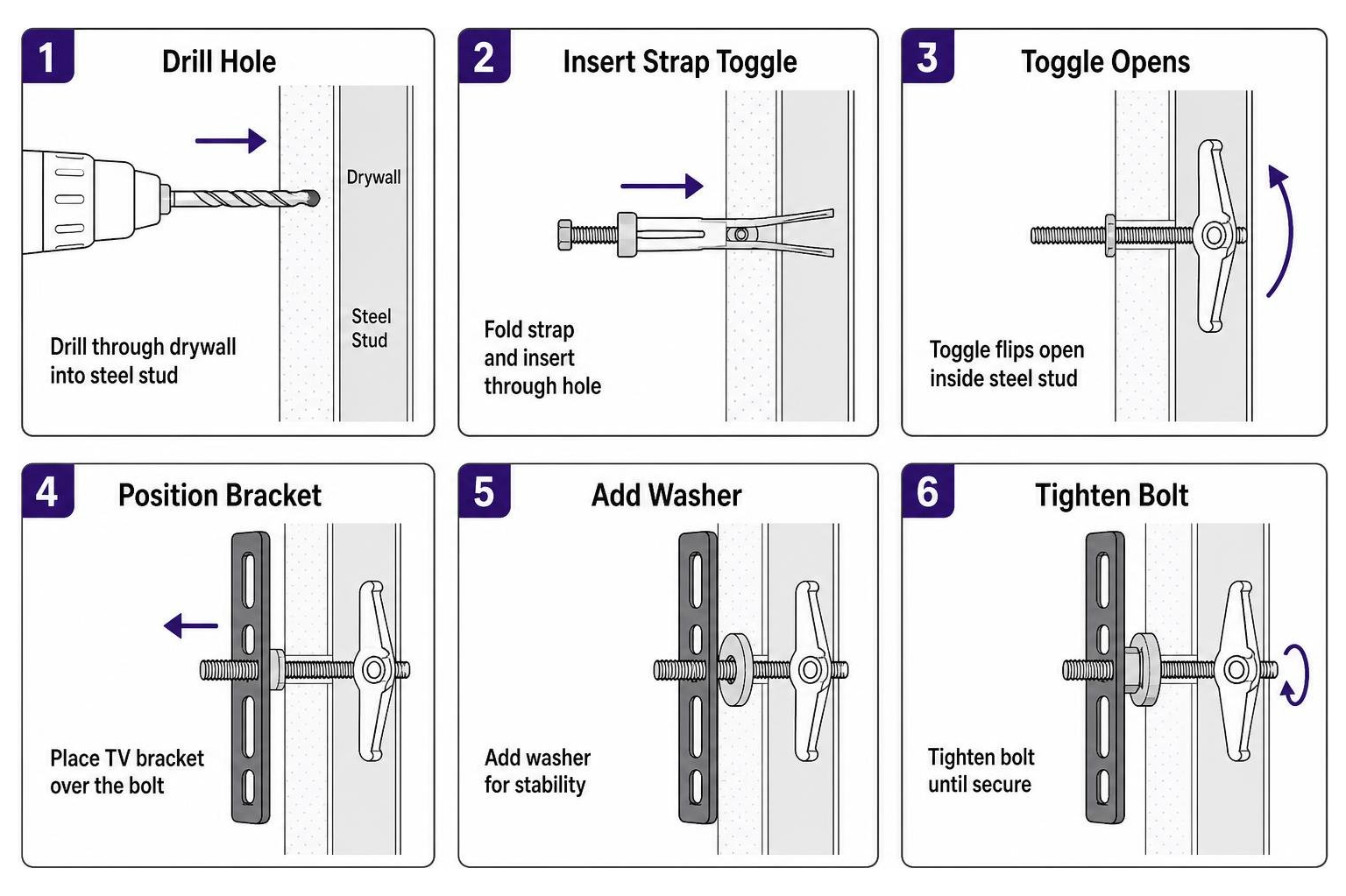
Step-by-Step Toggle Anchor Installation Guide
Follow these steps when installing strap-style toggle bolts on a hollow drywall wall:
- Mark Bracket Mounting Points: Hold the TV wall plate against the wall at the desired height. Use a bubble level to ensure alignment. Mark a minimum of four mounting points—two on the top rail and two on the bottom rail—spaced as wide apart as the bracket allows.
- Verify Wall Cavity Clearances: Check behind the wall with an electronic stud scanner to ensure no plumbing lines or electrical wiring run behind the marked locations. Toggle channels require at least 1-7/8 inches of rear cavity clearance to pivot into place.
- Drill the Holes: Chuck a 1/2-inch drill bit (or the exact diameter specified by the manufacturer) into your drill. Drill perpendicularly through the drywall. Keep the drill steady to avoid wallowing out the hole diameter. For detailed toolless installation advice, view our install guide.
- Insert the Metal Channel: Hold the fastener’s plastic straps together and slide the metal channel lengthwise through the drilled hole.
- Seat the Channel: Pull the plastic ring toward you so the metal channel seats flush against the rear face of the drywall.
- Slide the Cap Flush: Slide the outer plastic collar down the straps until the flange sits firmly against the front face of the drywall.
- Snap Off the Straps: Push the exposed straps side to side to snap them off flush with the wall surface.
- Hang and Secure the Bracket: Position the TV bracket over the holes. Insert 1/4″-20 machine bolts with washers through the bracket slots and thread them into the seated metal channels. Tighten with a hand screwdriver until snug.
Critical TV Mounting Mistakes to Avoid
- Using Plastic Expansion Plugs: Conical or ribbed plastic expansion plugs rely entirely on friction and radial pressure against the chalky gypsum core. Under the sustained shear of a heavy display, the gypsum core fractures, allowing the plug to pull free.
- Overtightening Fasteners: Driving machine bolts with an impact driver can crush the drywall core beneath the anchor head. Once the gypsum core is crushed, its structural load capacity drops significantly. Hand-tighten all bolts until firm.
- Reusing Damaged Anchor Holes: Never insert a new anchor into a hole where a previous fastener pulled out or wallowed out the gypsum. The surrounding drywall matrix is compromised. Shift your bracket horizontally by at least 2 inches to drill into solid, undamaged sheetrock.
- Narrow Fastener Grouping: Placing four anchors grouped closely together in the center of a bracket concentrates stress on a single small section of drywall. Space your upper and lower anchors as wide as the bracket frame allows to distribute the load across a larger surface area.
Frequently Asked Questions About TV Drywall Anchors
For additional structural mounting topics, explore our detailed FAQ section.
Can I mount a 75-inch TV directly to drywall without studs?
A standard 75-inch flat-screen TV typically weighs between 60 and 85 lbs. While four heavy-duty strap toggles or load-distributing fasteners hold this static shear weight in sound 1/2-inch or 5/8-inch drywall on a low-profile fixed bracket, mounting large-format displays directly into hollow drywall without stud engagement carries real risks.
Large screens have wide frames that can be bumped during daily use, which transfers leverage forces into the wall. If wood studs are accessible, drive 5/16-inch or 3/8-inch lag bolts into at least two studs. If the screen must be centered between studs, use a hybrid approach: secure one side of the bracket into a wood stud with lag bolts and use heavy-duty toggle anchors for the off-stud bracket holes.
Can plastic drywall anchors hold a television bracket?
No. Standard ribbed plastic wall anchors, hammer-in plugs, and small self-drilling nylon anchors are designed for static lightweight items like small pictures, decorative clocks, or bathroom accessories under 15 lbs. They should never be used for TV mounting.
Plastic plugs lack the rear-wall contact area required to handle sustained shear loads and pull out quickly when exposed to outward leverage forces.
How many anchors are needed to mount a TV safely?
Use a minimum of four heavy-duty anchors for any TV wall mount bracket. Distribute them across the four outer corners of the wall plate: two fasteners securing the upper horizontal rail and two securing the lower horizontal rail.
If the bracket features additional mounting slots and spans across a wide wall area, adding two intermediate anchors along the top rail provides extra load distribution across the drywall sheet.
Conclusion
Securing a television without direct wood stud support requires matching your hardware to the physics of your wall. Always select fasteners with published shear ratings that substantially exceed the combined static weight of your screen and mounting plate.
Avoid basic plastic plugs, keep your mount low-profile to minimize pull-out leverage, and space your anchor points widely across undamaged drywall. If you want a complete walkthrough on stud-free installation methods, check out our guide to mounting a TV without studs.