
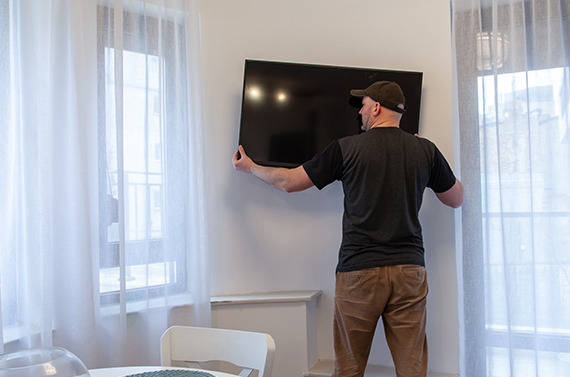
Choose the Right TV Anchor Before You Drill
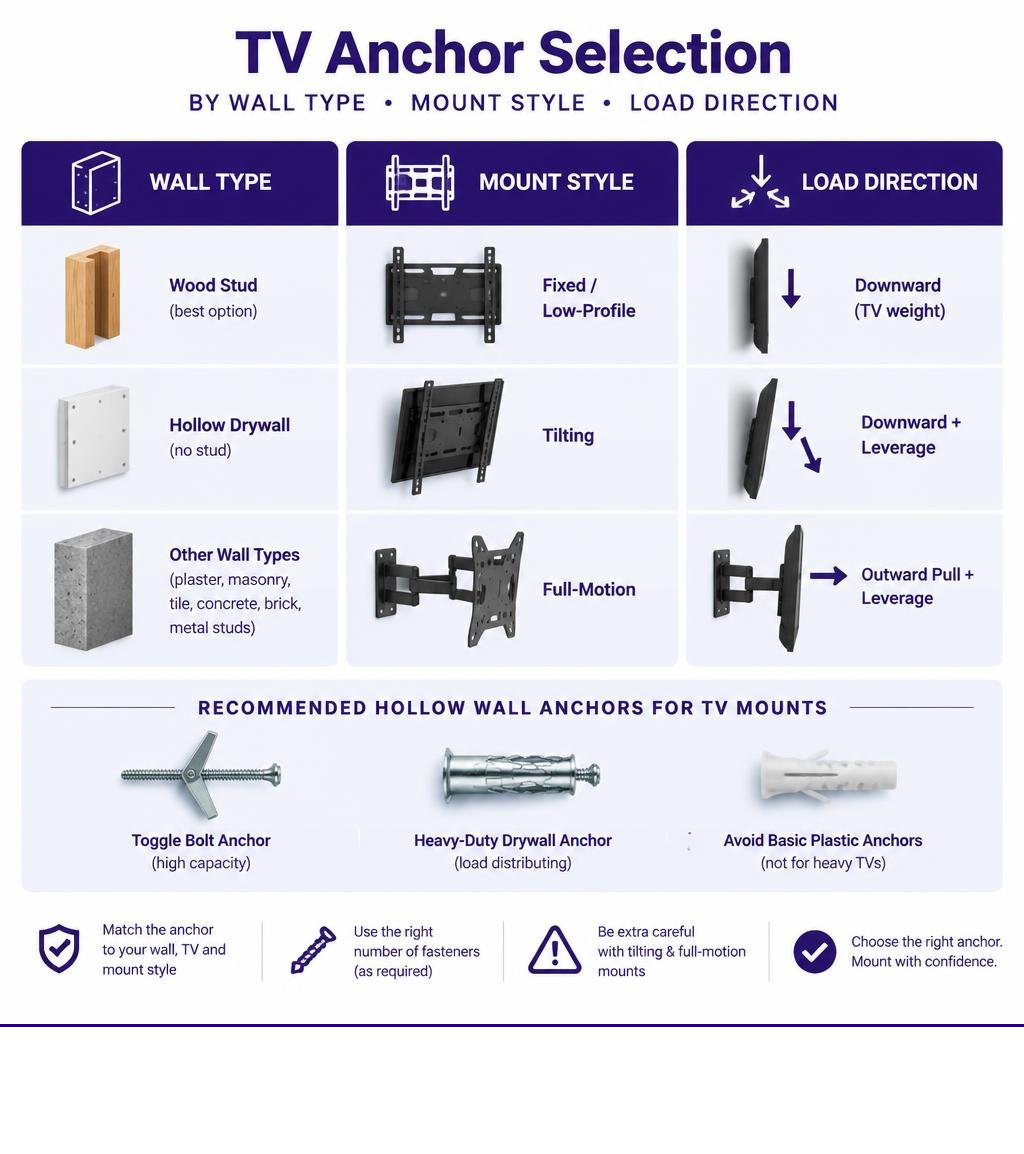
For the best hollow wall anchors for mounting TV, use a stud whenever you can. If no wood stud lines up with the bracket, choose a heavy-duty anchor made for hollow drywall, match it to the wall thickness and mount style, and use several fasteners as the mount maker requires.
For a fixed or low-profile TV mount on sound 1/2 in or 5/8 in drywall, high-capacity toggles and load-distributing anchors are usually the strongest no-stud options. Avoid basic plastic expansion anchors for heavy TVs. Be more cautious with tilting and full-motion mounts because the extended arm adds outward pull and leverage, not just the TV’s downward weight.
A heavy static TV on a fixed bracket needs a different anchor than a small monitor on a flat mount. Match the fastener to the total weight of the display and bracket, the wall thickness, and the mount profile before cutting or drilling. For a broader comparison of fastener classes, see this drywall anchor overview.
Mounting terms and installation methods explained:
- toggle bolt anchor for tv mount
- hanging a tv on drywall without studs
- installing tv mount on drywall without studs
Understanding Physical Forces and Drywall Load Capacity
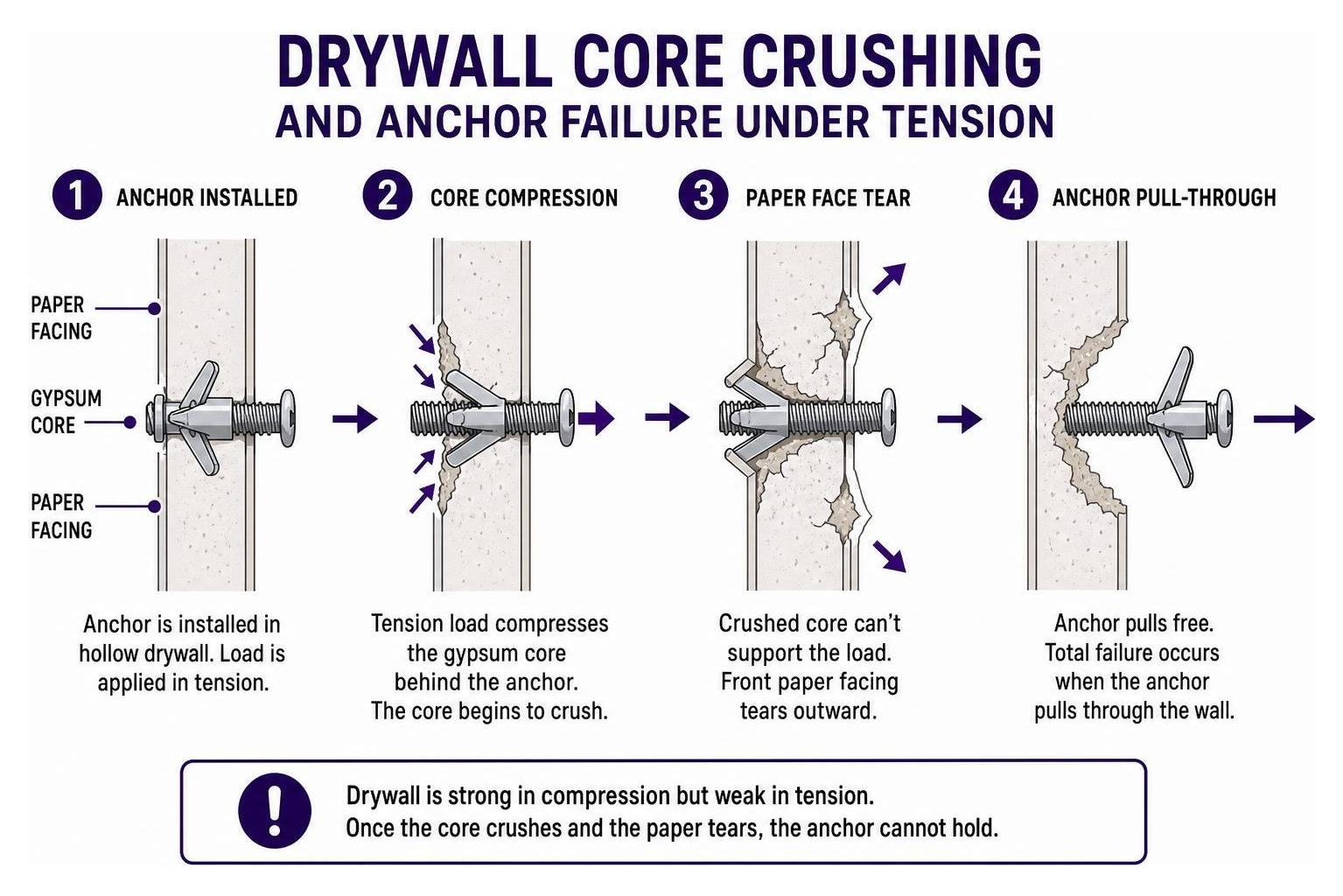
Drywall consists of a brittle gypsum core encased in paper facing. Standard residential walls use 1/2-inch wallboard, while commercial builds and fire-rated assemblies commonly use 5/8-inch drywall. Gypsum has decent compressive strength, but its structural integrity under localized tension is poor. When you mount hardware to a hollow wall, the fastener relies entirely on the strength of this gypsum core and paper sandwich to resist mechanical failure.
Understanding how loads transfer to hollow drywall is essential. Anchors fail through a process called core crushing and paper face tear-out. If a fastener’s surface area is too small, the steel or plastic crushes the soft gypsum core into powder. Once that core crumbles, the front paper layer tears outward under load, resulting in total anchor pull-through. This is why reviewing our drywall anchor shear ratings explained is critical before selecting mounting hardware.
Always design your mounting setup with a safety factor of at least 4:1. If your display and bracket weigh 50 lbs combined, your collective anchoring hardware must be rated for at least 200 lbs to handle accidental bumps, cable tugs, and material fatigue.
Shear vs. Tension: How TV Mounts Pull on Hollow Walls
Every wall mount exerts two distinct mechanical forces: shear and tension.
- Shear force is the vertical, downward load parallel to the wall surface caused by gravity acting on the television’s mass.
- Tension (pull-out force) is the horizontal load perpendicular to the wall, pulling the top fasteners straight out of the drywall.
Fixed, low-profile wall brackets keep the display flat against the wall, translating roughly 90% of the load into downward shear. Hollow wall fasteners manage shear well because the wallboard resists downward cutting forces across a wider plane.
Tilting and full-motion articulating mounts change the physics completely. Extending an articulating arm 18 inches away from the wall turns the display into a physical lever. This cantilever leverage multiplies the tensile pull on the top mounting bolts. While the TV’s downward weight remains 40 lbs, the outward rotational torque can exert upwards of 120 lbs of direct pull-out force on the top anchors. Before deciding between wallboard fasteners and structural framing, review our guide comparing a drywall anchor vs stud support.
Evaluating Drywall Anchors by Weight Class
To pick the correct hardware, match the fastener type to the weight of your TV and your specific wall structure. Check how to select the right drywall anchor for your load to calculate total bracket loads accurately.
| Anchor Type | Drywall Condition | Rated Safe Shear Capacity (Per Fastener) | Recommended Max TV Weight (Total Display) | Compatible Mount Style |
|---|---|---|---|---|
| Plastic Expansion Plug | 1/2 in or 5/8 in | 10–20 lbs | Under 10 lbs (Monitors only) | Fixed Only |
| Self-Drilling Zinc / Nylon | 1/2 in Drywall | 40–75 lbs | Up to 25 lbs (Small displays) | Fixed / Flat Only |
| Steel Molly Bolt | 1/2 in Drywall | 50–90 lbs | Up to 40 lbs | Fixed or Minor Tilt |
| CondoMounts Elephant Anchor | Steel Stud (25 gauge) | 90–200 lbs | Up to 70 lbs | Fixed / Tilting |
| Bullfix TV Anchor | 1/2 in Drywall | Up to 255 lbs (Kit total) | Up to 65 lbs | Low-Profile / Tilting |
| SNAPTOGGLE (1/4″-20) | 5/8 in Drywall | Up to 356 lbs | Up to 80 lbs | Low-Profile / Tilting |
| WingIts Master Anchor | 1/2 in Drywall | Up to 300 lbs | Up to 75 lbs | Low-Profile / Tilting |
| GHOSTUD GS2 | 1/2 in or 5/8 in Drywall | Up to 1,000 lbs shear | Heavy static displays | Fixed / Heavy Flat |
Step-by-Step Guide: How to Install Heavy-Duty Hollow Wall Anchors
Installing hollow wall hardware requires precise drilling and careful torque control to prevent stripping the wall cavity. Follow this step-by-step drywall anchor guide to prepare your tools and workspace.
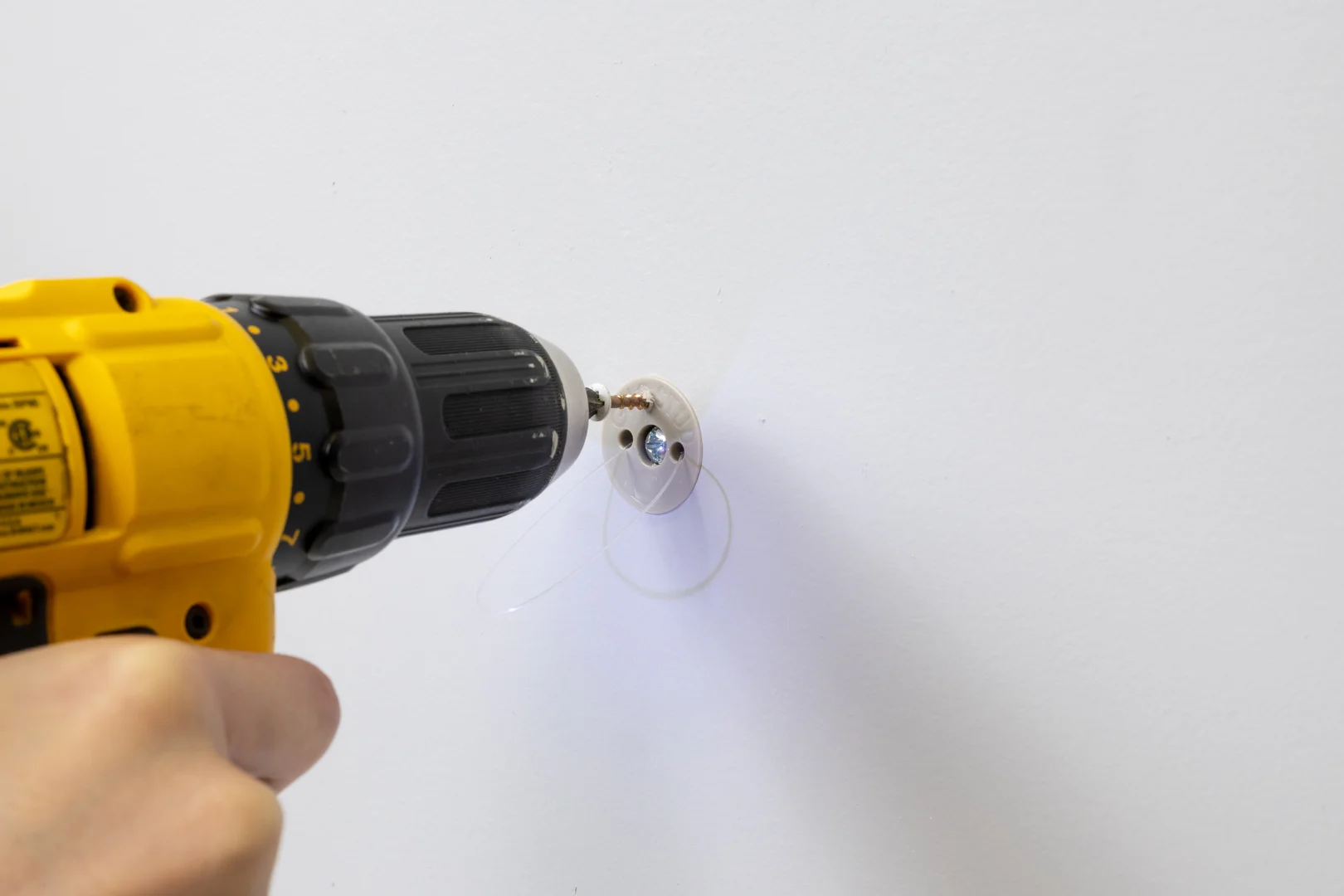
Required tools and safety gear:
- Personal protective equipment (safety glasses and dust mask)
- Electronic stud finder
- 24-inch bubble level or torpedo level
- Cordless drill and driver
- Appropriately sized drill bit or hole saw (per anchor specs)
- Hand screwdriver (Phillips or hex head matching hardware)
- Painter’s tape and pencil
Pre-Drilling and Wall Cavity Clearance
- Scan the intended mounting location with an electronic stud finder. Check for standard 16-inch center wood framing. If a stud is available at your desired TV position, fasten directly into the wood framing using lag screws instead of hollow wall hardware.
- Confirm wall cavity clearance. Measure behind the wallboard using a small probe if necessary. Toggle bolts require at least 1-7/8 inches of open cavity depth behind the drywall to allow the metal channel to flip open freely.
- Mark your bracket hole locations using a bubble level. Apply a piece of painter’s tape to the wall first to keep the drill bit from wandering and prevent the drywall paper from tearing.
- Drill the required pilot holes. If you are using standard 1/4″-20 toggle bolts, use a 1/2-inch drill bit. For specialized toggle hardware, consult our guide on how to choose the correct toggle bolt size for a TV mount. Always hold the drill at a 90-degree angle to the wall to keep the hole straight.
Securing the Mounting Bracket Safely
- Insert the anchor channels through the drilled holes into the wall cavity. Ensure the metal wings clear the back of the drywall and snap into their perpendicular locking position.
- Slide the retaining collar or plastic strap flush against the front surface of the drywall until the channel sits snug against the interior back face of the board. Snap off the excess plastic straps flush with the wall.
- Position the metal TV wall bracket over the anchor collars.
- Thread the machine bolts through the bracket holes and into the anchor channels by hand to prevent cross-threading.
- Tighten the bolts securely with a hand screwdriver. Avoid using high-speed impact drivers on drywall anchors. Over-tightening will crush the gypsum core, compromising the anchor’s holding power. Tighten until the bracket sits flat against the wall without flex. For complete steps, see our walkthrough on installing a TV mount without studs.
Heavy-Duty TV Wall Anchor Roundup and Reviews
Selecting the right hardware comes down to matching your TV’s static weight and bracket profile with an anchor built for that specific load class. For a broader look at mounting options, refer to our ultimate guide to choosing a TV drywall anchor.
Light to Moderate Loads: Self-Drilling and Expansion Anchors
For lightweight applications under 25 lbs—such as small 24-inch kitchen monitors or lightweight flat panels—commodity self-drilling anchors provide a simple solution.
Products like the E-Z Ancor Twist-N-Lock are rated for 75 lbs shear in drywall. These zinc or nylon anchors feature wide external threads that cut directly into drywall without pre-drilling. Self-drilling zinc drywall anchors work well for lightweight hardware accessories that do not carry heavy static loads.
That self-drilling anchors depend entirely on the fragile gypsum core gripped by their threads. They are suitable for light, static monitors on flat mounts, but never use them for dynamic loads, medium-to-large TVs, or tilting brackets.
Heavy Loads: Snap Toggles and Steel Stud Solutions
When you need serious holding power for 32-inch to 65-inch flat panels, strap toggles and expanding metal anchors are the standard choice. Learn more about these mechanisms in our guide comparing molly bolts vs toggle bolts.
- SNAPTOGGLE Heavy Duty Toggle Bolts: These fasteners utilize a solid zinc-plated steel channel that passes through a 1/2-inch hole and pulls flat against the back of the wall. A SNAPTOGGLE can hold up to 356 lbs in 5/8-inch drywall, outperforming old-style spring wings by spreading the load over a larger steel surface.
- Bullfix TV Kit Drywall Anchors: Designed specifically for flat-screen brackets, the Bullfix system uses patented expanding wings that open inside hollow cavities and dot-and-dab walls. The kit is rated for up to 255 lbs, making it a reliable hollow-wall solution for fixed and tilting TV brackets.
- CondoMounts Elephant Anchors: Designed for metal stud framing and hollow drywall in commercial buildings or modern apartments. A 1/4-inch Elephant Anchor kit is rated for 200 lbs on 25-gauge steel studs and up to 90 lbs in drywall alone.
- Taiss Heavy-Duty Toggle Bolts: Sold in multi-packs with 1/4″-20 machine bolts, these metal hollow-wall anchors support up to 270 lbs each in 1/2-inch drywall.
- WingIts Master Anchor (MAW35): Built from fire-retardant structural plastic, this fastener is rated up to 300 lbs in drywall and handles vector forces 360 degrees around the mounting point. It requires a 3/4-inch hole.
While toggle bolts offer high holding power, they have one mechanical downside: cyclic loading. If a TV is repeatedly tilted or bumped, the thin metal channel can slowly crush the gypsum edge behind the hole, causing the fastener to loosen over time.
Ultra Heavy-Duty Mounts: Structural Backing for Gypsum Board
For large static displays, heavy mirrors, or floating audio-video credenzas on hollow drywall, point-load toggles can concentrate too much stress on a small area of the wallboard.
We developed the GHOSTUD GS2 specifically for these heavy static loads. The GS2 installs with a standard 2-inch hole saw and acts as an internal structural anchor. By utilizing a wide, load-distributing internal backing plate made in the USA from 100% recycled plastic, it spreads forces across a much wider surface area of the drywall than narrow metal toggle channels can manage.
The GS2 is rated for up to 1,000 lb shear in 1/2 in or 5/8 in drywall. That this 1,000 lb figure is strictly a shear rating, not a pull-out rating. It is built for heavy static loads like TVs on fixed brackets, heavy shelving, and large mirrors. The trade-offs: it requires cutting a 2-inch hole into your drywall, costs more per unit than standard metal toggles, and represents a permanent structural installation rather than a temporary fix.
Common Mistakes, Edge Cases, and When to Avoid Hollow Wall Anchors
Hollow drywall fasteners are reliable when installed correctly, but choosing the wrong anchor for your wall type can lead to sudden failure.
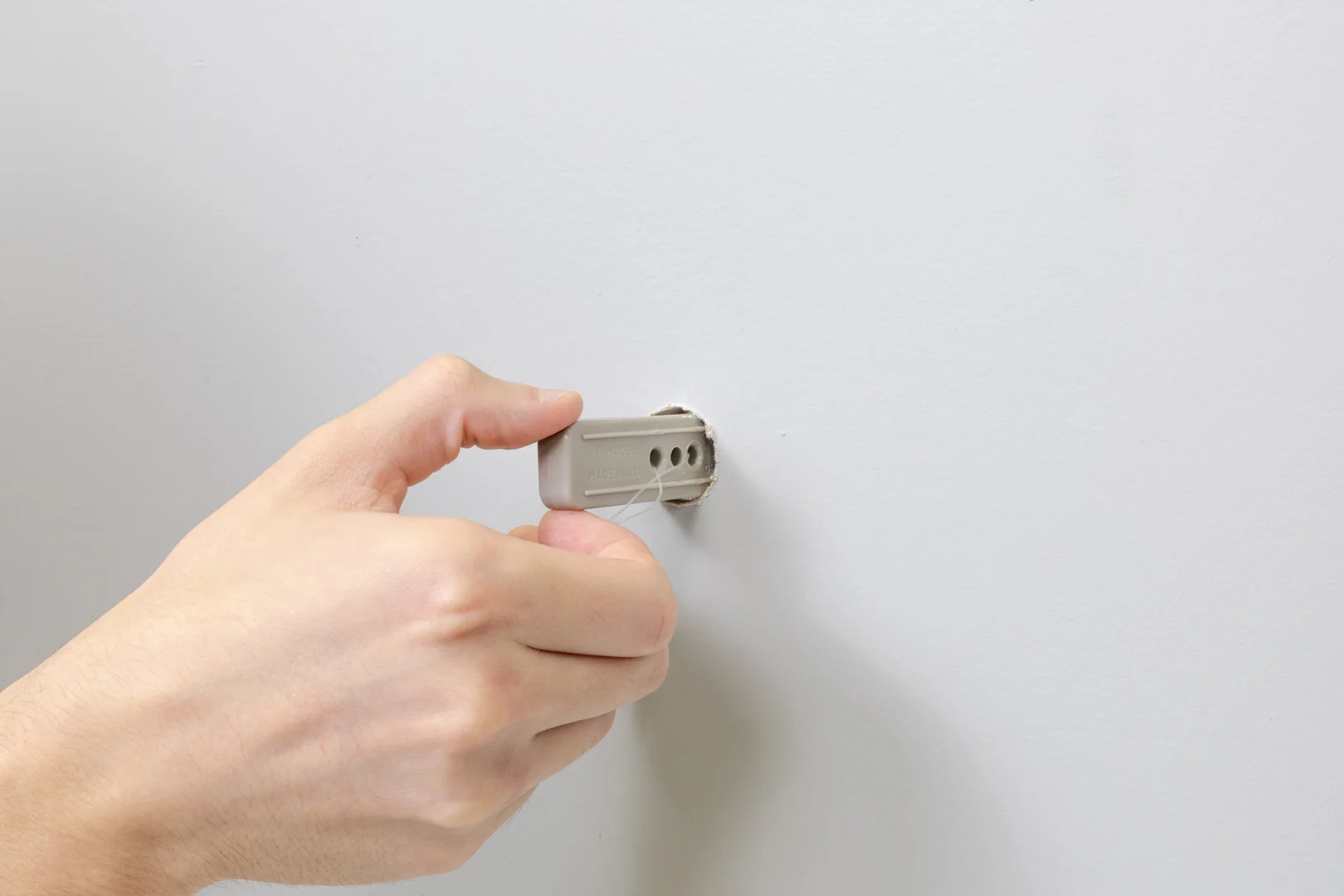
Common mounting mistakes:
- Over-tightening machine screws: Driving screws with high-speed impact drivers crushes the gypsum core and strips the anchor’s threading.
- Re-drilling blown-out holes: Never install a new anchor into a wall cavity where drywall has previously crumbled. Move the bracket vertically or patch the damaged area first.
- Using plastic expansion anchors: Conical plastic plugs work by expanding against the sides of a solid hole. In hollow drywall, they have zero mechanical grip and will pull straight out under the weight of a TV.
- Exceeding hole size specs: Drilling an oversized pilot hole allows the anchor collar to slip, resulting in bracket wobble and uneven weight distribution.
Articulating Mounts and Dynamic Cantilever Forces
Do not mount full-motion, dual-arm articulating TV mounts to hollow drywall using only wall anchors.
When you pull a 55-inch television 20 inches away from the wall and swing it to the side, the physics change dramatically:
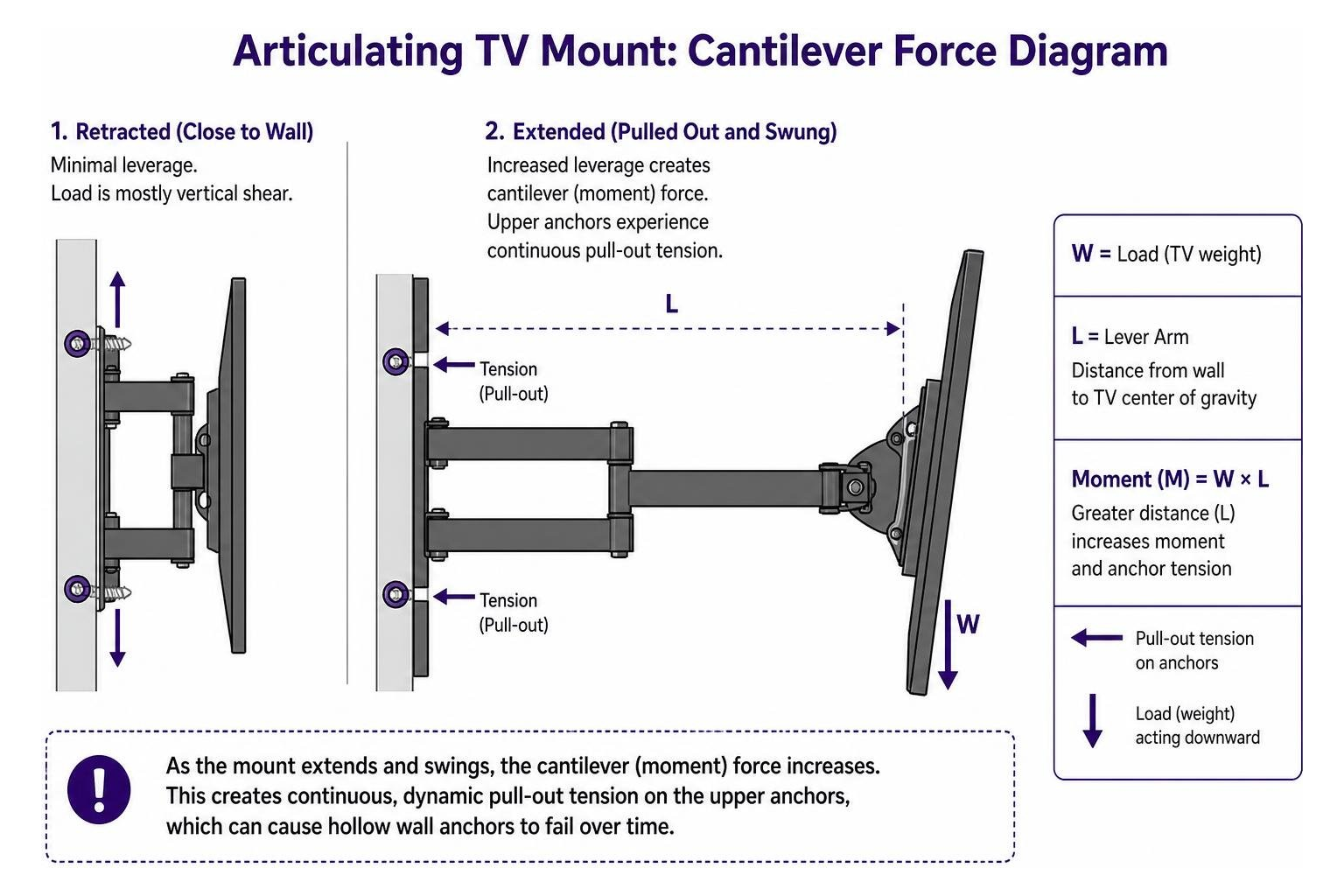
This rotational leverage exerts continuous, dynamic pull-out tension on the upper wall anchors. Under repeated movement, hollow anchors will wallow out the gypsum core, causing progressive failure and wall tear-out.
If you must install an articulating mount and no wood studs align with the display’s location, install a 3/4-inch hardwood or plywood backer board. Span the backer board horizontally across two adjacent 16-inch wood studs using structural wood screws, then bolt your articulating bracket directly into the wooden backer board.
Plaster, Concrete, and Non-Drywall Wall Types
Hollow drywall anchors are engineered strictly for modern gypsum wallboard. Using them on other wall substrates will cause failure.
- Plaster and Lath: Old plaster walls consist of brittle mortar pressed over thin wooden lath strips. Drilling large holes for heavy toggles or hole saws can crack the plaster keys, causing the plaster to separate completely from the lath. Use dedicated masonry anchors or locate the underlying framing studs.
- Solid Concrete and Masonry: Solid masonry has no hollow cavity for toggle wings or backing plates. Use ALLIGATOR all-purpose solid wall anchors (which hold up to 1,025 lbs in solid concrete) or steel masonry sleeve anchors.
- Metal Studs: Commercial metal studs are cold-rolled steel (often 25-gauge). Standard drywall screws will strip right out of them. Use specialized metal stud toggle hardware, such as CondoMounts Elephant Anchors, to secure brackets to steel framing.
When GHOSTUD is the wrong choice:
- If an accessible wood stud is available, always drive lag screws directly into the stud instead of using our drywall anchors.
- If your display setup weighs under 5 lbs, standard lightweight picture hardware is simpler and avoids drilling a large hole.
- If your walls are plaster, lath, brick, concrete, stucco, tile over backer board, or framed with metal studs, our anchors will not work. GHOSTUD GS1 and GS2 are engineered exclusively for 1/2 in or 5/8 in drywall.
- Never use GHOSTUD for grab bars, safety rails, handrails, fall-prevention devices, or any application supporting human body weight.
Frequently Asked Questions About TV Wall Anchors
Can you reuse hollow wall anchors if you change TVs?
Standard hollow wall toggles cannot be fully reused. When you back the machine screw out of an old-style toggle bolt, the metal spring wing drops down inside the wall cavity. Strap-toggle anchors (like SNAPTOGGLE) keep the metal channel held against the back of the drywall with a plastic collar, allowing you to back out the bolt and mount a different bracket using the same threaded channel. However, if the drywall surrounding the hole has cracked or compressed, you must drill a fresh hole at a new location.
Is it ever completely safe to mount a TV without hitting a wood stud?
Yes, mounting a TV without studs is safe if you use heavy-duty hollow wall hardware (like heavy-duty toggle bolts or structural drywall anchors), keep the TV on a low-profile or fixed mount, and stay within the weight limits of your wallboard. For dynamic, long-arm articulating mounts, you should always secure the bracket into wood framing or install an external plywood spanning plate across two studs.
What drill bit size is needed for heavy-duty toggle bolts?
Drill bit sizing depends on the anchor brand and shank diameter:
- Standard 3/16-inch toggle bolts typically require a 3/8-inch drill bit.
- Heavy-duty 1/4″-20 strap toggles require a 1/2-inch drill bit.
- WingIts Master Anchors require a 3/4-inch hole (using an APACHE200 bit).
- GHOSTUD GS2 anchors require a 2-inch hole saw.
Always check the manufacturer’s packaging before drilling into your wall.
Conclusion
Mounting a TV on hollow drywall requires the right hardware, proper hole sizing, and a clear understanding of load direction. For comprehensive instructions and framing alternatives, check out our complete guide to mounting a TV without studs and browse our other guides.
Before you hang your bracket, walk up to your wall and complete this final safety checklist:
- Tap the wall and scan with a stud finder to confirm whether a wood stud is present.
- Check your wall substrate. Confirm you are working with sound 1/2 in or 5/8 in drywall rather than plaster, masonry, or tile.
- Check your mount profile. Use hollow wall anchors only for low-profile, fixed, or minor-tilt brackets. If you have an articulating arm, build a plywood spanning plate across two studs instead.
- Verify your fastener load ratings against the total combined weight of your display and mounting bracket, maintaining at least a 4:1 safety factor.
- Drill your pilot holes carefully to the exact manufacturer diameter, insert your toggle hardware, and tighten all machine screws by hand.
For more mounting guidance, explore our complete library of drywall mounting guides.